
How to Apply to I-CAMZ: Signup Steps With Screenshots
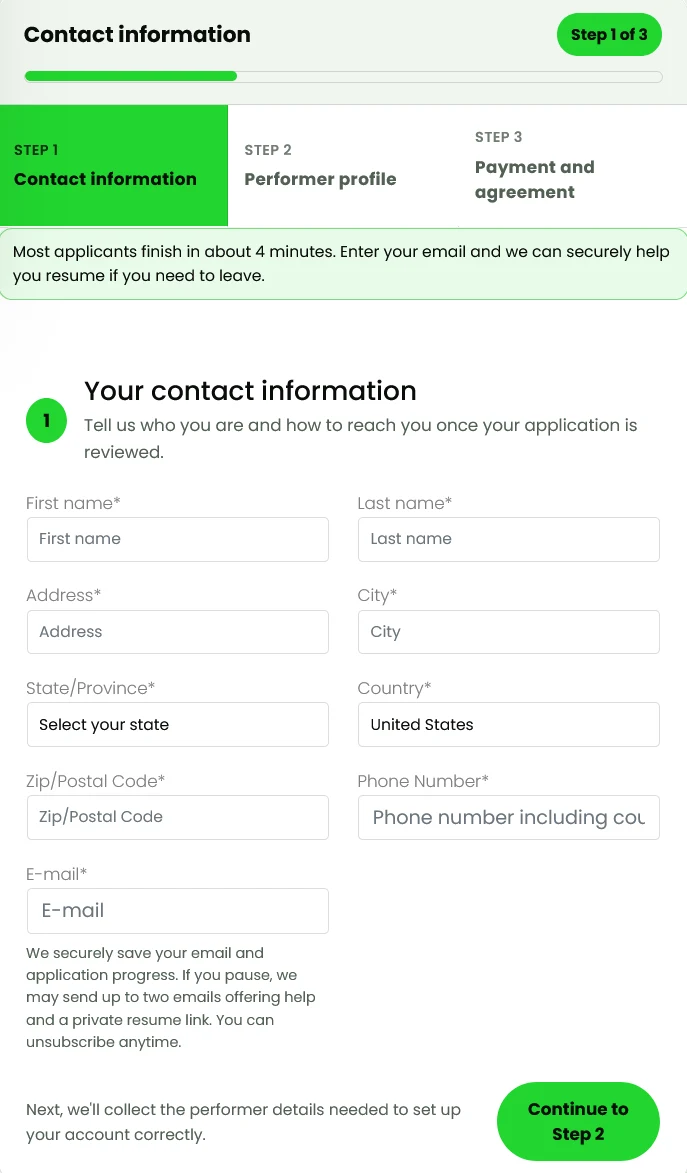
The application takes about four minutes and is split into three steps: contact details, performer profile, and payment with the final agreement. Below you can see each screen exactly as it looks, with what to fill in and what to leave as it is.
Prepare three things
- An email used only for this work, separate from your personal one: it protects your privacy.
- A stage name and two or three alternatives, in case the first is taken. Never use your real name.
- Open the form from our button: this way the agent code is filled in automatically and you get support from the first day.
I-CAMZ application: your contact information
In the first step you enter your first and last name, address, city, state or province, country, postal code, phone number with country code and email. These details are used only to review your application and contact you: users will never see them.
Your progress is saved securely. If you stop halfway, you may receive up to two emails with help and a private link to resume the application, and you can unsubscribe at any time.
Your performer profile and the agent code
Here you set up your performer account: date of birth, gender, ethnicity, sexual preference, body type and hair colour. Body type appears only after you choose your gender.
Then choose your performer name and click Check name to see if it is available. It can be 5 to 32 characters long, using letters, numbers or underscores, and any number in it must be 18 or higher. The three backup names are optional: if your first choice is taken, the team uses them and contacts you if something needs to change.

Payment method and final agreement
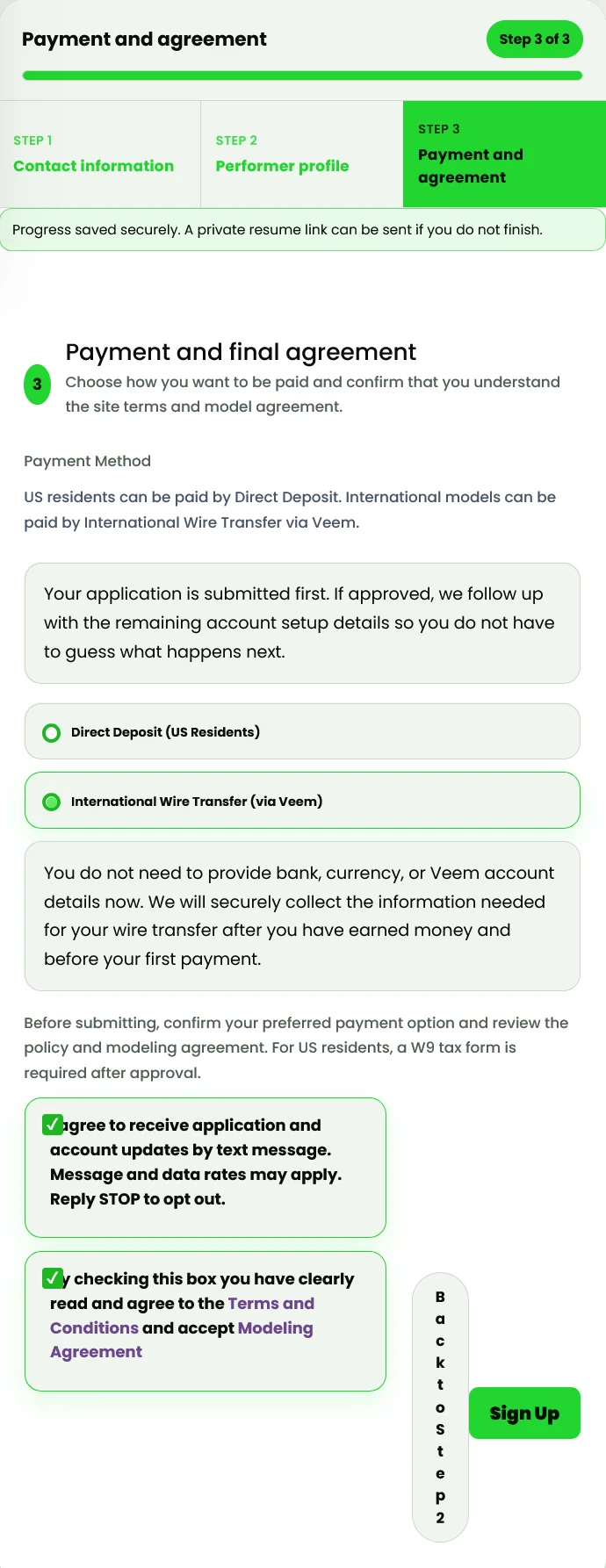
Choose how you want to be paid: Direct Deposit if you live in the United States, or International Wire Transfer via Veem if you live in another country.
Good news if you choose Veem: you do not need to enter bank, currency or Veem account details now. They are collected securely later, after you have earned and before your first payment. US residents fill in a W-9 tax form after approval.
Finally, tick the boxes to receive updates by text message and to accept the terms and the modeling agreement, then click Sign Up. Take a minute to read the agreement before accepting it.
What happens after the I-CAMZ signup
You see a confirmation page, and within 24 to 48 hours you receive an email with your login details. If you use Gmail, add the sender to your contacts so the message does not end up in spam, and check the spam folder anyway.
Then you complete the remaining setup and prepare your first stream. If you already applied, do not send a new application: use the private link you received by email to continue.

Still have questions?
Read our overview I-CAMZ for models and the I-CAMZ FAQ on pay, privacy, taxes and equipment. For a general overview of this job, see the webcam model page on Wikipedia.
If you prefer conversation to free shows
On many cam sites, crowds watch for free. On StudioHotLine, models are not allowed to undress in the public chat in front of hundreds of users who do not pay: in public they stay dressed and focus on conversation, also with the built-in translator. If the model wants, anything more happens only in private, for the one person who pays.
Start your application
Open the form from the button below, so the agent code is filled in for you.
Designed for working from home, with support and a relationship with users that stays on the site.
Sign up free →Affiliate links · Adults only